
RACO Monitoring Center

Your whole remote operation in one place

The RACO Monitoring Center is the cloud platform for managing your RACO devices: configure alarms, route voice, text, and email notifications, and review every event from anywhere. No SCADA build-out, no software to install.
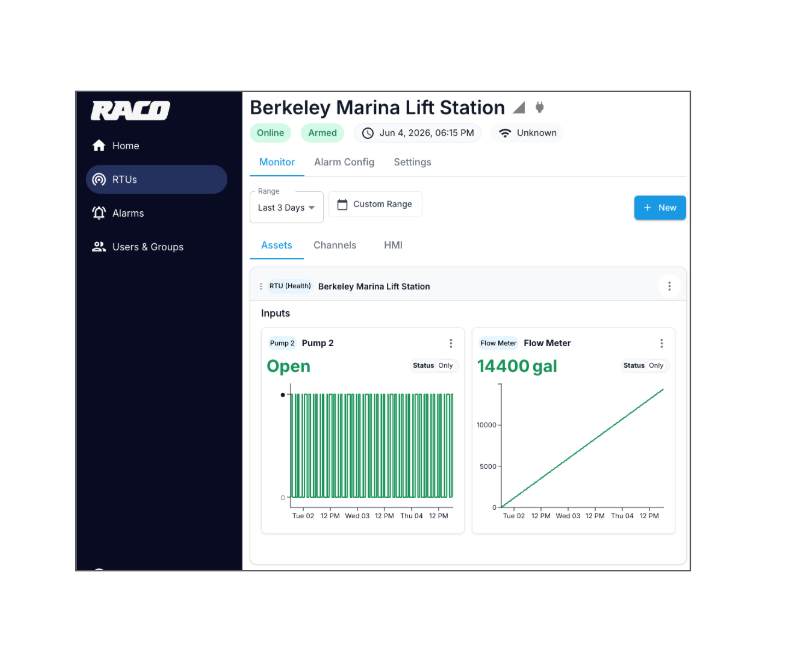
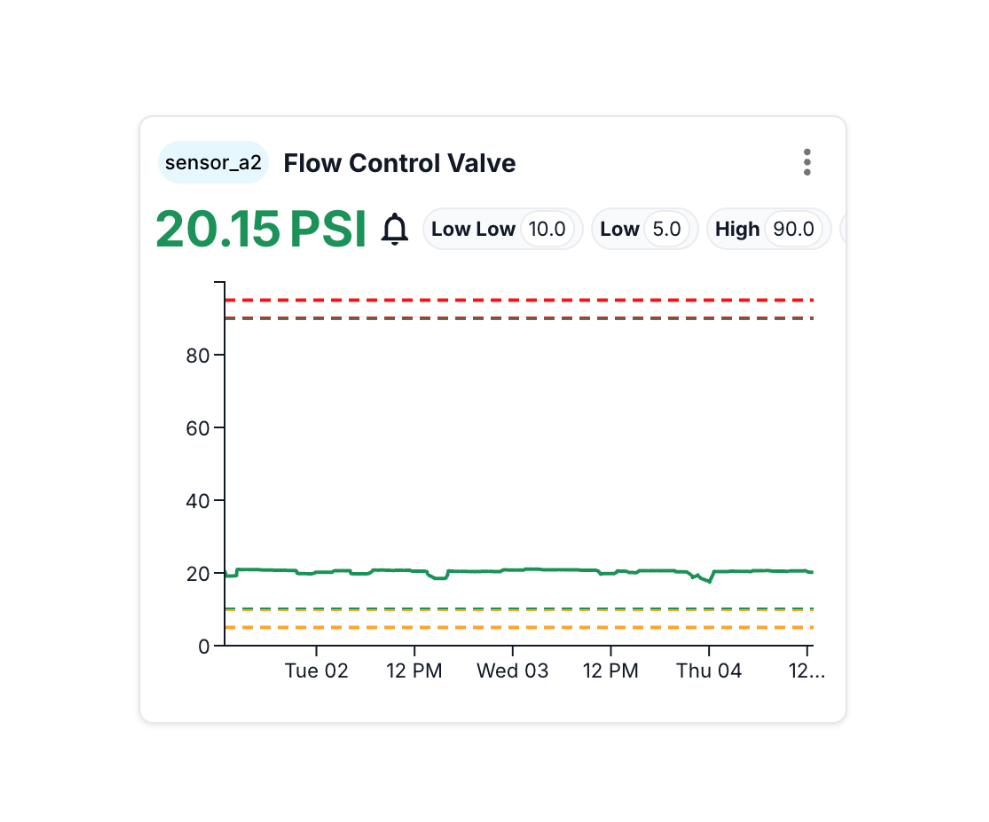
RTU Status - RMC - Large Data Card - RMC - Large

RMC

The management layer for your field devices.

Your devices run alarm logic locally and the Monitoring Center is where you configure them, route notifications, and keep the record. Like the hardware it manages, it is built to do one job well.

What the RMC is

  • The cloud app for configuring your RACO devices and sites
  • Where you set channels, alarm thresholds, and notification groups
  • A central, timestamped log of every alarm and acknowledgment
  • Accessible from any browser, on desktop or mobile

What the RMC is not

  • A SCADA or process-control system
  • A life-safety or emergency-response system
  • A guarantee of notification delivery (delivery is best-effort)
  • A replacement for local safeguards and response procedures

Capabilities

Everything you need to run a fleet of remote sites.

Set it up once, manage it from anywhere, and let the platform keep the record.

Device & site management

Register devices, assign them to sites, and see the status of your whole operation at a glance.

Channel & alarm setup

Configure digital and analog channels, set Hi/HiHi/Lo/LoLo thresholds, trip delays, and two-point analog scaling in engineering units.


Notification routing

Deliver voice call, SMS, and email alerts identifying the site, channel, condition, and timestamp to the right people.

Acknowledgment & event log

Acknowledge alarms from the web or a phone keypad. Every event, acknowledgment, and return-to-normal is timestamped and logged.

Device health monitoring

A built-in connectivity-loss channel watches each device's scheduled check-in, so you know if one stops reporting.


Out of the box configuration

Replace with a short paragraph describing the capability or feature.

Remote & scheduled arm/disarm

Suppress nuisance alarms during maintenance windows, on demand or on a schedule, without a trip to the site.

Security

TLS end-to-end, no inbound ports

Easy to implement

From device to dashboard in three steps.

No IT project, no on-premise servers, no inbound ports to open.

1. Register your device

Add the device to your account and assign it to a site. It comes pre-provisioned for connectivity.

2. Configure alarms & contacts

Define channels, thresholds, and trip delays, then build the notification and escalation groups for your team.

3. Monitor from anywhere

Watch live status, receive alerts, acknowledge events, and pull reports from any browser, any time.

Applications

Reach the right person, the right way, in the right order.

Build notification groups that match how your team actually responds, and let the platform escalate until someone acknowledges.

  • Voice, SMS, and email, set per contact
  • Sequential or simultaneous (blast) delivery
  • Configurable delay between sequential contacts
  • Automatic escalation if no one acknowledges
  • Return-to-normal alerts with an independent delay
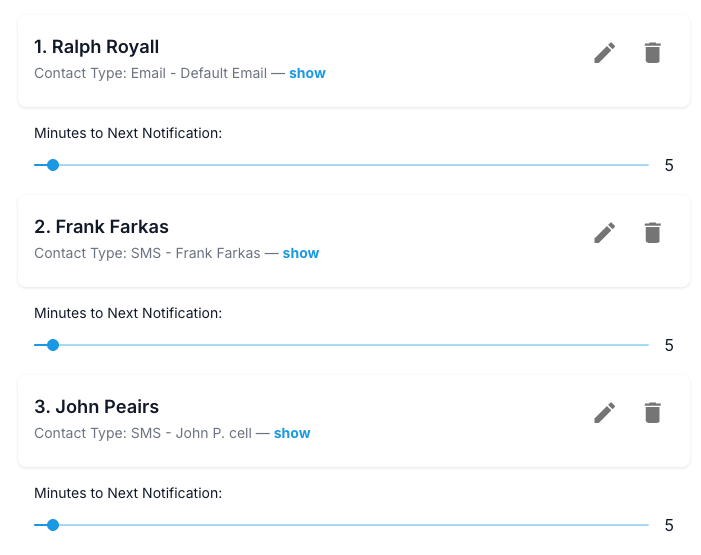
Notification groups

Integrated solution

Pairs with the Verbatim Gen2 out of the box.

Every Verbatim Gen2 RTU ships pre-provisioned to connect to the RACO Monitoring Center. Power it on, register it, and your channels and alarms are ready to configure in minutess
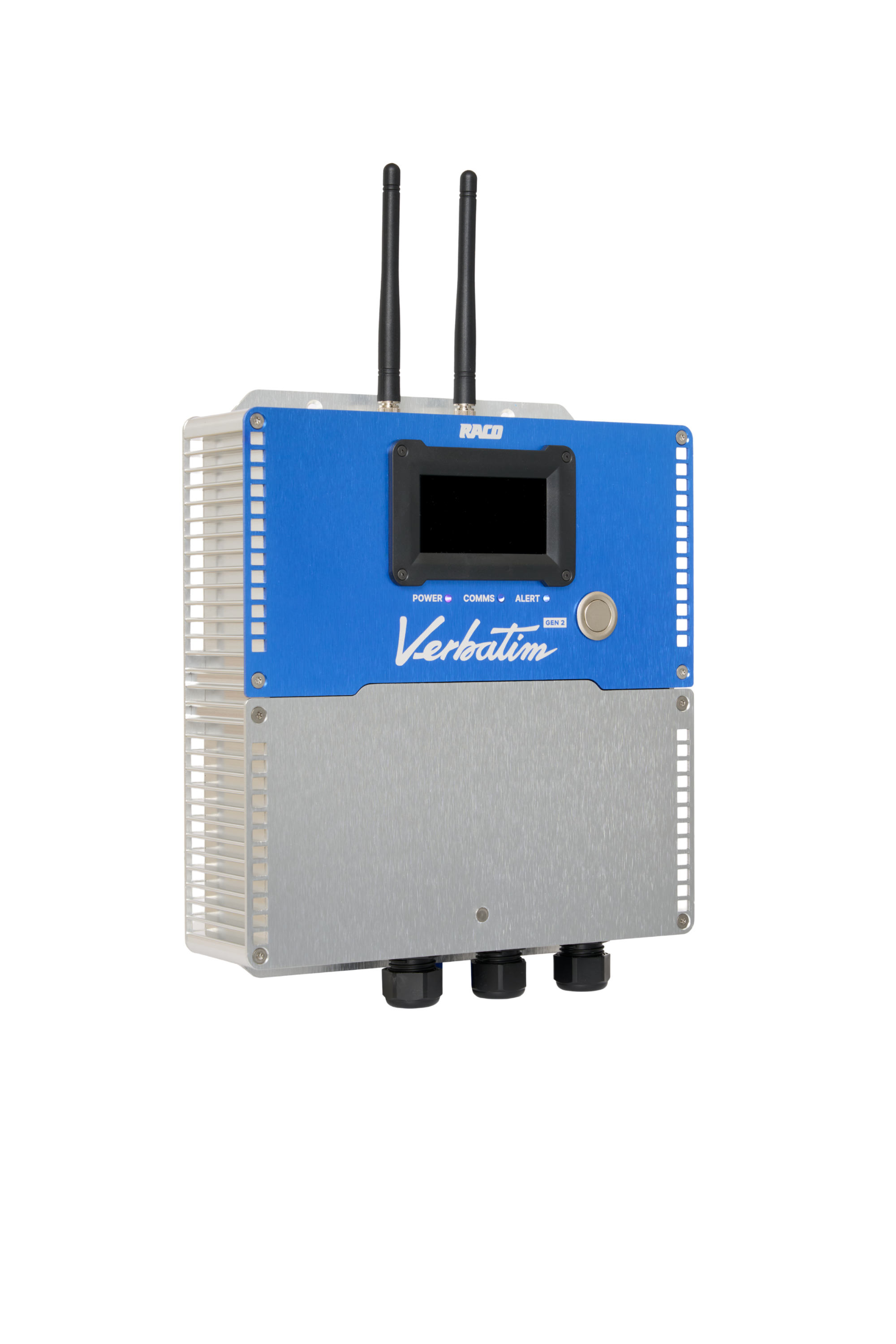
 

Verbatim Gen2 - Transparent1

Questions? We've got answers

FAQ

Where does alarm logic actually run?

On the device. Each RTU evaluates alarm conditions locally and independently. The Monitoring Center handles logging, notification routing, acknowledgment, and escalation.

Do I need to install software?

No. The RACO Monitoring Center is a web application that runs in any modern browser on desktop or mobile.

What devices does it work with?

The RACO Monitoring Center manages the Verbatim Gen2 RTU out of the box. It also works with existing AlarmAgent RTUs. Planned PLC and industrial-protocol integration (EtherNet/IP, Modbus TCP) is on the roadmap for a future release.


Delivering legendary service

Backed by real people who know this market

RACO has manufactured industrial monitoring equipment in the United States for decades. When you call, you reach a technician, not a queue.
IMG_7001

Live Help for Life

Free live chat with trained RACO technicians during business hours, plus a toll-free line at (800) 722-6999. Onboarding and regular refresher training at no cost.

Always-on resources

A 24/7 web support center with documentation, wiring diagrams, commissioning checklists, and FAQs, optimized for desktop and mobile.

Built to last

A 24-month hardware warranty, signed over-the-air firmware updates, and a watchdog that recovers from faults without a site visit.

Don't be shy

Talk to a RACO expert

Tell us about your sites and a real person will help you scope the right setup. No SCADA project required.

Documentation

Brochures

Verbatim Automatic Dialing Remote Monitoring System -  PDF Download

Specifications

Dialer Specifications - Verbatim Model DSP - PDF Download

Dialer Specifications - Verbatim Model DSP - DOC Download

Owner's Manual

Verbatim Owner's Manual - PDF Download

Verbatim Quick Start Guide - PDF Download

Verbatim Common Questions - PDF Download

Submittals

Verbatim Autodialer Submittals - PDF Download

Mechanical and Electrical
CAD Drawings

Verbatim with No Options - PDF Download

Verbatim with NEMA 4x Enclosure - PDF Download

Verbatim with Cellularm Option - PDF Download

Options

Digital Input Monitoring Option - PDF Download

Analog Signal Input Monitoring Option - PDF Download

Application Bulletins

Dallas Aquarium Increases Animal Protection - PDF Download

New England Small water system implements 24-hour monitoring - PDF Download

Closed-Loop Control System for Remote Facilities - PDF Download

Chemical Distributors Monitor Customer Inventory Levels with RACO Verbatim Systems - PDF Download

RACO Central Watchdog System Automatically Verifies Phone Line and Autodialer Operation - PDF Download

National Energy Group Application Presentation - PDF Download

South Carolina Sewer Group is Streamlining for Success - PDF Download